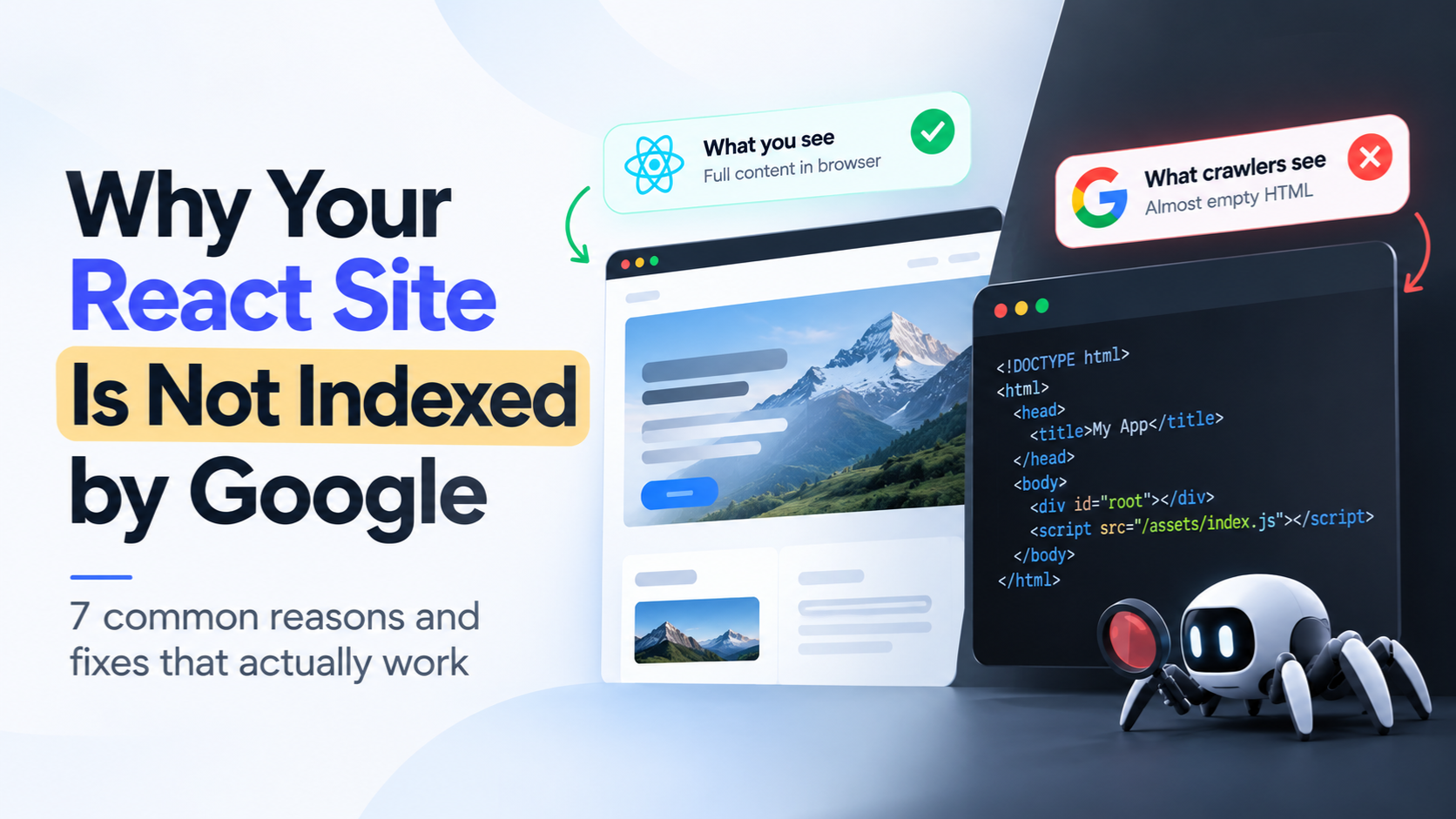
A React site not indexed by Google almost always has the same root cause: search engines and AI crawlers receive an almost empty HTML page, and your content only appears after JavaScript runs. This guide shows how to confirm that in 30 seconds, the seven most common causes, and the fixes that actually work.
What a React site not indexed by Google looks like to a crawler
A client-side React app (built with Vite, Create React App, Bolt, Replit and similar tools) ships a tiny HTML file. Everything else is built in the browser after JavaScript downloads and runs. Open the raw HTML of a typical client-side React site and this is all there is:
<!DOCTYPE html>
<html>
  <head>
    <title>My App</title>
  </head>
  <body>
    <div id="root"></div>
    <script src="/assets/index.js"></script>
  </body>
</html>
Your headline, product copy, blog posts and internal links are not in that file. A visitor’s browser fills them in after the script runs. A crawler that does not run the script sees an empty box, which is why a React site not indexed by Google looks perfectly fine to its owner and empty to a crawler.
Google can render JavaScript, but not on your schedule
Google does run JavaScript, so React sites are not impossible to index. But rendering is a separate step from crawling. According to Google’s own JavaScript SEO documentation, pages go through crawling, rendering and indexing, and rendering only happens when Google’s resources allow it. Pages wait in a queue, and anything that loads late or fails can be missing from what Google stores. For a newer site with little authority, that queue is where pages sit as “Discovered, currently not indexed” or “Crawled, currently not indexed” for a long time. Other search engines vary in how much JavaScript they run at all.
Many AI crawlers read only the raw HTML
AI search tools like ChatGPT, Perplexity and Claude depend on their own crawlers and fetchers. A 2024 study by Vercel and MERJ found that none of the major AI crawlers it analyzed, including those from OpenAI and Anthropic, rendered JavaScript, while Gemini relied on Google’s own rendering infrastructure. Crawler behavior can change over time, but the safe assumption is that a crawler may read only the raw HTML. If your content only exists after rendering, your site can be missing from AI answers even when it looks perfect in your own browser.
You can’t win AI search if AI can’t read your site.
How to check a React site not indexed by Google in 30 seconds
You do not need a tool to see the core problem. Use View Source.
- Open your live site in Chrome.
- Press Ctrl+U (Cmd+Option+U on Mac) to open the page source. Do not use Inspect, which shows the page after JavaScript has run.
- Search the source for a sentence from your homepage.
If you find it, that content is in the raw HTML. If you only see an empty <div id="root"></div> and a script tag, that is what any crawler that skips JavaScript receives from your site.
For a clearer picture, run the free Instant Check at crawllify.com. It shows the gap between what crawlers can read on your page and what your visitors actually see, with no signup needed. To see how AI tools read your pages, try the AI Visibility Checker as well.
If you suspect a React site not indexed by Google, two statuses in Google Search Console are worth watching: pages marked “Discovered, currently not indexed” and pages marked “Crawled, currently not indexed”. They can have other causes, but on a client-side React site they often point to the rendering gap above.
Seven reasons for a React site not indexed by Google
A React site not indexed by Google usually has at least one of these seven causes. The first three are rendering problems. The last four are code and configuration problems that are easy to miss.
- Your content only exists after JavaScript runs. This is the root cause for most client-side React sites. The server sends an empty shell and the browser builds the page, so any crawler that skips the script has nothing to index.
- Your content loads after an API call. If a page fetches its data inside
useEffect, the first version of the page is a spinner or an empty layout. Even a crawler that does render JavaScript may capture the page before the data arrives. - Titles and meta descriptions are set by JavaScript. When tools like react-helmet set them in the browser, crawlers that skip JavaScript see the same generic title on every URL, so your pages look like duplicates of one another.
- Navigation uses click handlers instead of real links. A
divwith anonClickthat callsnavigate('/pricing')works for visitors, but crawlers discover pages by following<a href="/pricing">links. If your menu is built from click handlers, crawlers may never find your inner pages. - Your routes use hash URLs. URLs like
/#/pricinglook like one page to Google, because everything after the#is ignored. Use browser history routing so that every page has its own clean URL. - Your robots.txt blocks the files needed to render. Google Search does not render JavaScript from blocked files, so check that your asset paths are crawlable.
- A noindex tag or soft 404 sits in the HTML shell. A default
noindexinindex.htmlthat JavaScript removes later is risky, because Google can skip rendering when the tag is in the original HTML. Also check what happens on an unknown URL. Many single-page apps return a normal 200 response with an empty app, which Google may treat as a soft 404.
Reasons 1 to 3 are solved by giving crawlers fully rendered HTML. Reasons 4 to 7 need a check in your code or hosting settings, and they are worth ten minutes of your time whichever fix you choose below.
How to fix a React site not indexed by Google
There are three realistic ways to fix a React site not indexed by Google, and all of them work by giving crawlers a complete page. The right one depends on whether you are starting fresh or already have a live site.
| Option | Best for | Effort | Trade-off |
|---|---|---|---|
| Server-side rendering or static generation (Next.js, Remix, Astro) | New projects and teams with engineers | High, since it means a rewrite and a redeploy | The best long-term architecture, but it is a rebuild |
| Build-time prerendering of fixed routes | Small sites with a handful of static pages | Medium | Does not cover pages that depend on live or changing data |
| A prerendering service (Prerender.io, SEO4Ajax, Crawllify) | Live React sites you do not want to rebuild | Low | A monthly cost, and you rely on a provider |
If you are starting a new project, server-side rendering is a strong choice. If your React site is already live, rebuilding it only to be found in search is a big detour. That is the gap a prerendering service fills.
Platforms are moving here too. Lovable now ships its own prerendering, which is a real step forward for its users. If you build on Bolt, Replit, plain React with Vite, or your own stack, you will usually still need a fix of your own.
Where Crawllify fits
Crawllify detects when a search engine or AI crawler requests your page, renders the full HTML, and serves it instantly. Your human visitors keep getting the normal React app, untouched.
- Simple install. Add an edge function snippet on Netlify or Vercel. There are no DNS changes and no rebuild.
- Wide coverage. 40+ crawlers, including Google, Bing, ChatGPT, Perplexity, Claude, Gemini and social preview bots.
- Proof, not hope. See crawler activity in real time, and see which of your pages are crawled most.
- More affordable. Plans start at $9 per month, billed monthly with no lock-in.
- Help getting started. Initial setup and implementation support from the Crawllify team is free.
Before you decide, run the free Instant Check at crawllify.com to see exactly what crawlers get from your site today.
What to expect once your React site is indexed
Once crawlers receive complete pages, they can finally read your headlines, copy, titles and links on the first visit. With Crawllify you connect once and aim to see results within 7 days, without checking in every week.
Be realistic about two things. Google decides when to index and rank a page, and no tool can promise a position. What you control is whether Google and every AI crawler has a complete page to work with, and that is the part that was missing.
To keep your momentum going after the fix:
- Check the real-time crawler activity to confirm bots are reading your pages.
- Review which pages are crawled most, and make sure they are the ones that matter for your business.
- Keep publishing useful content, because a site that can be read now has something to be found for.
Frequently asked questions
Can Google index a React site?
Yes, Google can render JavaScript and index React pages. But rendering is queued and not guaranteed, so client-side React sites are often indexed slowly or only in part, especially newer sites.
Why is my React site not indexed by Google?
Google visited the page but chose not to add it to the index, or has not rendered it yet. On a client-side React site, a common reason is that the page looked empty or thin when it was first processed, and “Crawled, currently not indexed” is the status to look for in Search Console. Other causes include low-quality or duplicate content, so check both.
Do I need Next.js to get my React site indexed?
No. Server-side rendering with a framework like Next.js is one solution, but you can also keep your existing app and give crawlers prerendered HTML through a prerendering service.
Can ChatGPT and other AI tools read my React site?
It depends on the crawler, but many AI crawlers read only the raw HTML. If your content appears only after JavaScript runs, they may see an almost empty page. View Source (Ctrl+U) shows you roughly what those crawlers receive.
Does prerendering change what my visitors see?
No. Visitors get your normal React app. Only crawlers are served the fully rendered HTML version.